


Digital Compass - GPS Compass
4.2202.00 Reviews
App Specs
- Version
- 6.6
- Updated On
- License
- Free
- Downloads
- 1,000,000+
- Developer
- Infinity Tech Systems
- Categories
- Travel & Local
- Platform
- Android
Screenshots
 Analysis by AppCompare
I treat a phone compass as a quick orientation aid, not a replacement for a map, trail knowledge, or a proper compass on a serious trip. That distinction matters with Digital Compass - GPS Compass: it brings direction and location tools together in one place, which can be handy when I need a fast answer, but the experience still depends on the phone and the conditions around me. For everyday exploring, that balance can work well; for remote travel, I would keep a backup.
When the network becomes part of the experience
A compass reading and a map view are not the same thing. Direction comes from the phone’s sensors, while map detail may rely on connectivity, so I would not assume that a useful compass screen means every surrounding map will be ready when service drops. The app’s map loaded smoothly for me in an area with patchy internet, but that is not a promise that it will behave identically in every dead zone.
My practical approach is to check the map while I still have a signal, then avoid making a route decision based on a map that has not finished loading. If I am heading somewhere unfamiliar, I also keep a separate route plan rather than treating a live map as my only reference. This is especially useful when a trail forks: a compass can tell me which way I am facing, but it cannot by itself tell me which branch reaches my destination.
Useful in ordinary mobile situations
The most convincing use case is not necessarily a major expedition. I can see this helping when I come out of a station or parking garage in a new part of town and want to orient myself before walking. A quick glance at north, followed by checking the map, can stop me from setting off in the opposite direction and having to double back.
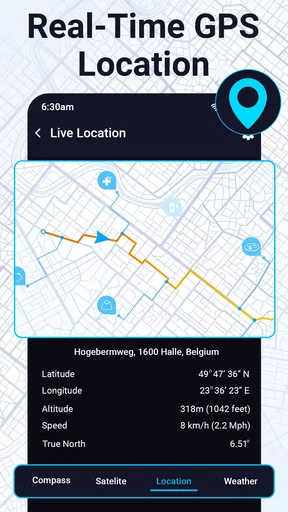
It also suits casual walks, camping, and bike rides where I want a little more context than a basic compass provides. Coordinates and altitude can help me describe where I am, while speed gives a simple snapshot when I am moving. I would treat those readings as helpful context, not as a substitute for specialist navigation equipment or a carefully planned outdoor route.
What I would do when a reading seems wrong
Phone compasses can be affected by nearby magnetic objects and the device’s own sensor calibration. If the pointer behaves strangely, I would first move away from metal furniture, a car, speakers, or other likely sources of interference. Then I would follow the phone’s calibration prompt if one appears and check whether the direction settles before relying on it.
That small pause is a useful habit, especially indoors or beside a vehicle, where a confusing reading may reflect the surroundings rather than a problem with the app. If location details or the map do not appear as expected, I would check the phone’s location settings and connection, then reopen the relevant view. The key is not to mistake a temporary device or network issue for reliable guidance.
Worth Reading Before You Choose

EA SPORTS FC Mobile 26 Is a Bigger Football Game, but It Takes Time

Flipboard Shows What News Apps Must Do Beyond the Feed

Switching to Android Auto Means Rethinking Your Driving Routine

Google Calendar Makes a Crowded Week Easier to Manage

Ludo King Makes the Most of the Minutes Between Plans

Baby Panda World Brings Quick Play to Modern Phones, but Its Game Library Feels Busy
Keeping use sensible on a trip
Because this app combines compass and GPS-oriented information, I would use the parts I need rather than leaving location-heavy views open without a reason. That is a practical way to limit battery use on a long day out, even though my camping trip experience felt reasonable on battery. Screen brightness, signal conditions, and how often I check the map can all affect a phone’s endurance, so I would start a hike with a charged phone and keep a power bank for longer outings.
For privacy-conscious users, the sensible first step is to review the phone’s location controls and decide when the app should have access. I would grant only the access needed for the functions I plan to use. That keeps the setup intentional and avoids assuming that every compass check requires the same location experience.
Digital Compass - GPS Compass is a free travel and local app from Infinity Tech Systems. It has a 4.1 average from around 1.1 thousand ratings, and it has been installed over a million times. The app is rated for everyone, and its current version is 6.0. Optional in-app purchases range from $14.99 to $39.99 per item, so I would check what is offered in the app before buying anything; the basic appeal here is having a straightforward compass and location-oriented tools together.
Compared with the compass already built into many phones, the main appeal is the combination of direction, coordinates, altitude, speed, and a map view. A built-in compass may be enough if all I want is north, while a general map app is usually better for turn-by-turn directions and route planning. This app sits between those options: more informative than a bare compass, but not something I would choose as my sole navigation system for a demanding journey.
I would recommend it to people who want a simple orientation tool for city wandering, casual cycling, or familiar outdoor routes. I would skip it as a primary tool if I need dependable turn-by-turn guidance, detailed trail planning, or navigation that I can count on without network access. The useful question is not whether a phone can point north, but whether the rest of my plan still works when the map or signal does not.
Ever been out on a hike, completely lost, and wished you had a magical tool to point you in the right direction? Well, say hello to Digital Compass - GPS Compass, your new best friend for all those adventurous outings. Let me walk you through my experience with this app, and why I think it’s a must-have for anyone who loves exploring the great outdoors.
Getting Started with Digital Compass
First things first, downloading and setting up Digital Compass - GPS Compass is a breeze. Available on both Android and iOS, it’s just a few taps away from guiding you on your next adventure. Once installed, I was greeted by a sleek and intuitive interface. It’s the kind of app that doesn’t need a manual—everything is laid out in a way that just makes sense.
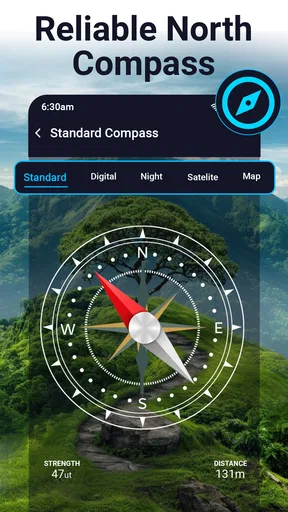
The app offers a variety of features, but at its core, it’s all about that trusty compass. You can easily switch between different modes—magnetic and true north. Personally, I found the true north mode pretty accurate, which is perfect for hiking in areas with a lot of magnetic interference. And, if you’re like me and tend to forget which way is which, the app’s visual cues are super helpful.
Features That Stand Out
Now, let’s talk about the features that really make this app shine. The GPS integration is a game-changer. Instead of just pointing north, you can actually see your coordinates and altitude. This is incredibly useful for those moments when you’re trying to figure out exactly where you are on a map. Plus, the app shows your speed if you’re moving—something I found surprisingly entertaining while on a leisurely bike ride.
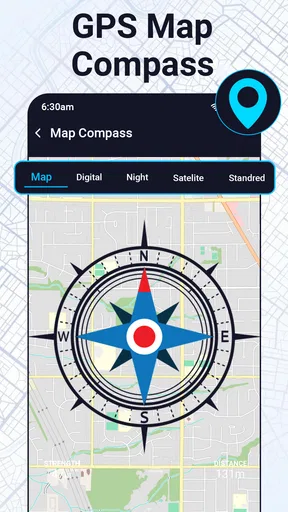
The app also includes a neat map function, which overlays the compass on a digital map. This can help you visualize your surroundings and plan your route effectively. It’s like having a mini navigator right in your pocket. I was particularly impressed by how smoothly the map loaded, even in areas with spotty internet.
Customization and Usability
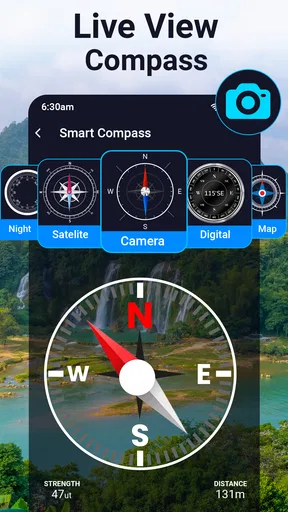
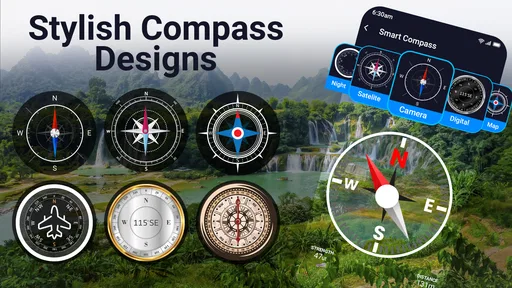
One of my favorite aspects of the app is its customization options. You can choose from different compass skins, which might sound trivial, but it’s a nice touch that makes the app more personal. I went for the classic design, but there are plenty of modern and quirky options if you’re feeling adventurous.
Usability-wise, the app is pretty straightforward. The buttons are well-placed, and there’s no clutter. It’s clear that a lot of thought has gone into making the user experience as smooth as possible. Whether you’re tech-savvy or a complete novice, you’ll find navigating this app a piece of cake.
Real-World Application
So, how does it perform in the real world? I took it with me on a weekend camping trip, and it didn’t disappoint. The compass was spot-on, even in dense forest areas where traditional compasses tend to fail. The GPS accuracy was impressive—I could pinpoint my location within a few meters.
The battery consumption was reasonable too. I was a bit worried that running GPS continuously would drain my phone, but the app seems to be optimized well. It’s always a relief to know you won’t be left with a dead phone halfway through your trek.
Final Thoughts
All in all, Digital Compass - GPS Compass is a fantastic tool for anyone who loves the outdoors. Whether you’re hiking, biking, or just exploring a new city, this app has got you covered. It’s reliable, easy to use, and packed with features that make navigation a breeze.
If you’re in the market for a digital compass, I highly recommend giving this one a try. It’s like having a little piece of technology magic in your pocket, ready to guide you on your next adventure. So go ahead, download it, and get exploring!
Pros
- Easy-to-use interface for quick navigation.
- Accurate and reliable digital compass readings.
- Includes offline maps for remote areas.
- Customizable settings to suit user preferences.
- Lightweight app with minimal battery usage.
Cons
- Limited features in free version.
- Ads can be intrusive during use.
- Requires GPS for full functionality.
- No integration with other navigation apps.
- Interface may seem outdated to some users.
FAQs for Digital Compass - GPS Compass
What features does the Digital Compass - GPS Compass app offer?
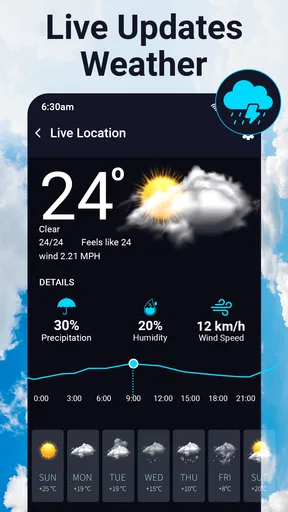
The Digital Compass - GPS Compass app provides a range of features including accurate directional guidance, real-time GPS tracking, altitude measurement, and a user-friendly interface. It's equipped with a digital compass that shows true north and offers additional functionalities like map integration and weather updates, making it a versatile tool for outdoor navigation.
Is the Digital Compass - GPS Compass app free to use?
Yes, the Digital Compass - GPS Compass app is free to download and use. However, there may be in-app purchases available for premium features or to remove ads, providing an enhanced user experience. It's best to check the app store listing for detailed pricing information and any potential subscription options.
How accurate is the Digital Compass - GPS Compass app?
The app is designed to provide highly accurate directional and location information by utilizing your device’s built-in sensors and GPS capabilities. However, accuracy can be affected by factors such as magnetic interference from nearby electronic devices or metal objects, so it's recommended to calibrate your device regularly for optimal performance.
Can the app be used offline?
The basic compass functionality of the Digital Compass - GPS Compass app can be used offline as it relies on your device’s internal sensors. However, features that require internet access, such as map integration and real-time weather updates, will need connectivity to function properly. It's ideal for both online and offline navigation.
Is the app compatible with all Android and iOS devices?
The Digital Compass - GPS Compass app is compatible with most modern Android and iOS devices. It requires a device with a built-in magnetometer and GPS capabilities to function correctly. For detailed compatibility information, check the app store listing for your specific device requirements and operating system version.


